유니티의 UI는 Rect 모양에 맞게 직사각형 형태의 클릭 영역만을 지원한다.
이 때문에 외곽에 투명한 영역이 많은 이미지를 사용할 때, 의도치 않게 빈 공간이 클릭되는 불편함이 발생한다.
하지만 Image의 alphaHitTestMinimumThreshold 속성을 조절하면
알파 값을 기준으로 특정 수치 이하의 투명 영역은 클릭을 무시하도록 설정할 수 있다.
매번 스크립트로 제어하는 번거로움을 줄이기 위해서
Inspector에서 조절할 수 있는 커스텀 클래스를 구현해보았다.
구현 스크립트
using UnityEngine;
using UnityEngine.UI;

#if UNITY_EDITOR
using UnityEditor;
using UnityEditor.UI;
#endif

[AddComponentMenu("UI/Alpha Threshold Image")]
public class AlphaThresholdImage : Image
{
    [Range(0f, 1f)]
    [SerializeField] private float _alphaThreshold = 0.5f;

    public float alphaThreshold
    {
        get => _alphaThreshold;
        set
        {
            _alphaThreshold = Mathf.Clamp01(value);
            applyThreshold();
        }
    }

    protected override void Awake()
    {
        base.Awake();
        applyThreshold();
    }
    private void applyThreshold()
    {
        alphaHitTestMinimumThreshold = _alphaThreshold;
    }

#if UNITY_EDITOR
    protected override void OnValidate()
    {
        base.OnValidate();
        applyThreshold();
    }

    [CustomEditor(typeof(AlphaThresholdImage), true)]
    [CanEditMultipleObjects]
    public class AlphaThresholdImageEditor : ImageEditor
    {
        private SerializedProperty _alphaThreshold;

        protected override void OnEnable()
        {
            base.OnEnable();
            _alphaThreshold = serializedObject.FindProperty(nameof(AlphaThresholdImage._alphaThreshold));
        }
        public override void OnInspectorGUI()
        {
            base.OnInspectorGUI();
            EditorGUILayout.PropertyField(_alphaThreshold);
            serializedObject.ApplyModifiedProperties();
        }
    }
#endif
}
이 코드의 핵심은 유니티 Image 클래스가 내부적으로 가지고 있는 alphaHitTestMinimumThreshold 속성이다.
이 값은 클릭을 인정할 최소 알파 값을 결정한다.
예를 들어, 이 값을 0.5로 설정하면, 알파 값이 0.5보다 낮은 영역은 클릭 이벤트가 무시된다.
Image 컴포넌트는 전용 에디터(ImageEditor)를 사용하기 때문에,
단순히 변수를 선언하면 Inspector에서 보이지 않는 문제가 있다.
이를 해결하기 위해 ImageEditor를 상속받은 AlphaThresholdImageEditor를 생성해서, 변수를 표시했다.
결과
Inspector 모습은 아래와 같다.
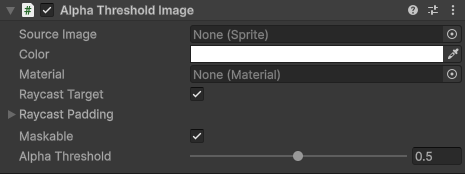
여기서 Alpha Threshold 값을 수정하면 된다.

투명 영역은 이벤트가 발생하지 않는 것을 확인할 수 있다.
이 기능은 CPU에서 텍스처의 픽셀 정보를 직접 읽어야 하므로,
해당 Sprite의 Texture Import Settings에서 Read/Write Enabled 항목이 체크되어 있어야 한다.
이 옵션을 켜면 텍스처 메모리가 약 2배로 증가하기 때문에,
일반적인 배경보다는 정교한 클릭이 필요한 중요 버튼 위주로 사용하는 것이 좋다.
'Unity > 기법' 카테고리의 다른 글
| [Unity] TrailRenderer로 역동적인 효과 만들기 (0) | 2026.03.10 |
|---|---|
| [Unity] 오브젝트가 꺼져도 멈추지 않는 코루틴 (CoroutineManager) (0) | 2026.03.02 |
| [Unity] 프레임 깎아먹는 if문 대체하기: 쉐이더 그래프 Keyword 노드 사용법 (0) | 2026.02.22 |
| [Unity] 쉐이더 그래프 경로 변경하기 (0) | 2026.02.21 |
| [Unity] MeshLOD로 간편하게 LOD 적용하기 (0) | 2026.02.21 |


댓글